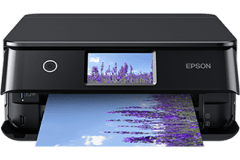
 Epson XP-8800 driver download. Windows 11, 10, 7 and macOS. Latest software to install your equipment.
- Capabilities: Print, scan, copy, Wi-Fi, set up, maintenance, customize.
- Type: Software installer.
 Windows 32/64-bit Wireless and USB installation
 Apple Mac Wireless and USB installation
File details
Windows – printer:
- Version: 3.00, December 2024.
- Language: Multiple languages.
- Description: This document includes the setup tool required to acquire all the essentials for utilizing your Epson XP-8800 either wirelessly or through a wired connection.
Windows – scanner:
- Version: 6.7.64.0, December 2024.
- Language: Multiple languages.
- Description: This file contains the driver installer for using your Epson XP-8800 wirelessly or wired for scanning purposes.
Mac – printer:
- Version: 13.26, October 2024.
- Language: Multiple languages.
- Description: This document includes the setup tool required to acquire all the essentials for utilizing your Epson XP-8800 either wirelessly or through a wired connection
Mac – scanner:
- Version: 6.7.64.00, October 2024.
- Language: Multiple languages.
- Description: This file contains the driver installer for using your Epson XP-8800 wirelessly or wired for scanning purposes.
Operating system compatibility list
Microsoft
- Windows 11.
- Windows 10, 7 32/64-bit.
Apple macOS
- 15 Sequoia.
- 14 Sonoma.
- 13 Ventura.
- 12 Monterey.
- 11 Big Sur.
- 10.15 Catalina.
- 10.14 Mojave.
- 10.13 High Sierra.
- 10.12 Sierra.
Additional Information
- Product: Epson Expression Photo XP-8800.
- Category: Color multifunction.